

Creating an ASP.NET MVC application to use the library
In this recipe, we will be creating an ASP.NET MVC application to use the library we have created.
Getting ready
Make sure you have completed the previous recipe. If not, you need to complete it before going through this one. If you have already done it, open it and do a quick build before we start.
How to do it..
- Open Visual Studio 2017.
- Now open the solution from the previous recipe. Click
File|Open|Open Project/Solutionor press Ctrl + Shift + O and select theChapter7.RestAPIsolution. - Press Ctrl + Shift + B for a quick build to check everything is fine.
- Now click on the
Chapter7.RestAPIsolution label. ClickFile|Add|New Project. - In the
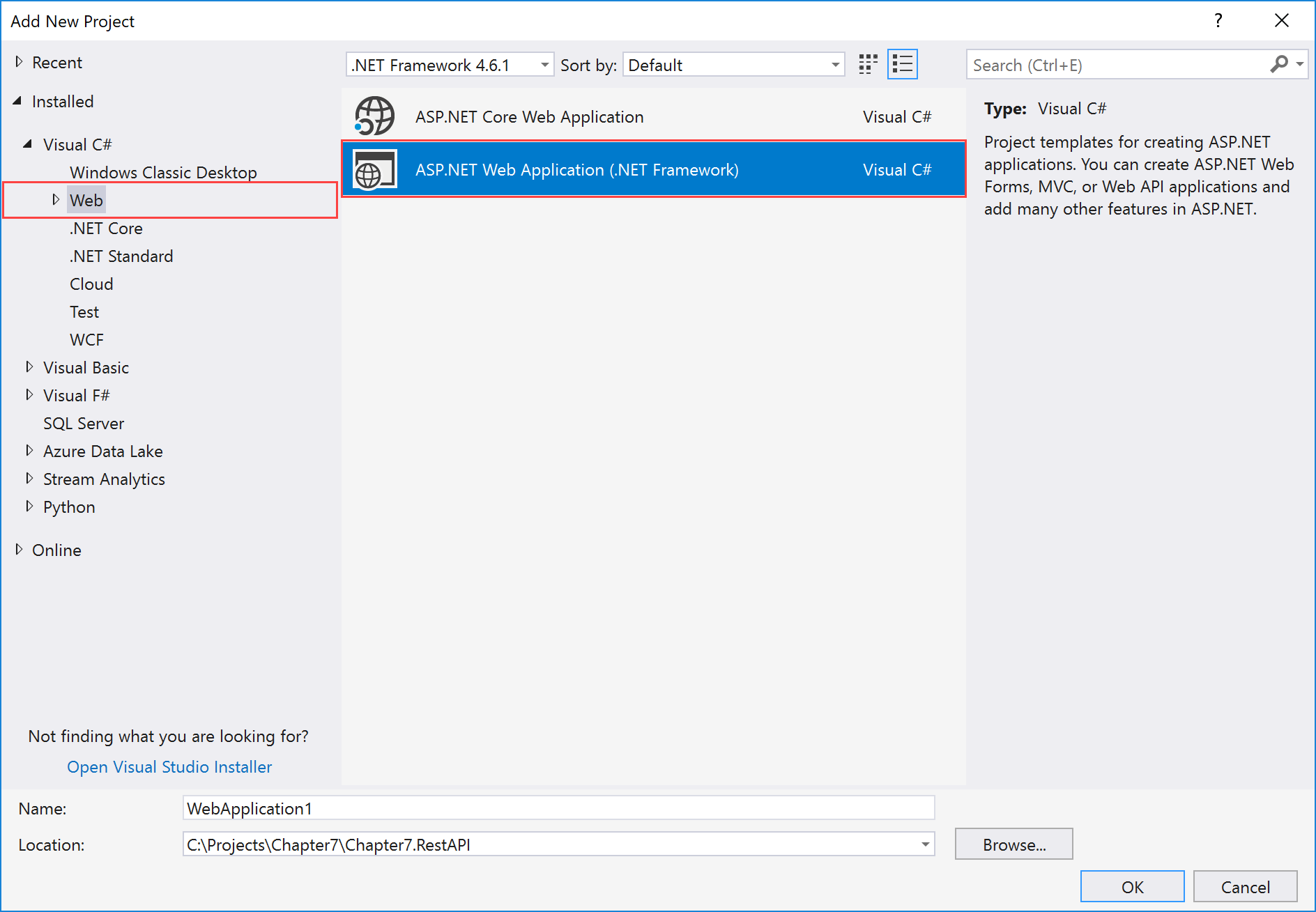
Add New Projecttemplate dialog box, expand theVisual C#node in the left pane. - Select
Weband selectASP.NET Web Application (.NET Framework)in the right pane:
- Now, in the
Name:textbox typeChapter7.RestAPI.RestMVCas the name and leave theLocation:textbox at its default value:

- In the
New ASP...