

Finding the control
There are many activities which can be used to find controls on screen/ applications. These activities are used to find or wait for an UI element.
Following are the activities that help in finding the controls:
- Anchor base
- Element Exists
- Element scope
- Find children
- Find element
- Find relative element
- Get ancestor
- Indicate on screen
We will discuss all these controls one by one.
Anchor base
This control is used for locating the UI element by looking at the UI element next to it. This activity is used when we have no control over the selector. That means when we do not have a reliable selector, then we should use the Anchor base control to locate the UI element.
We can use the Anchor base control as explained in the following section:
- Drag and drop a
Flowchartactivity on the Designer panel of a blank project. Also, drag and drop anAnchor basecontrol from theActivitiespanel. Connect theAnchor basecontrol withStart. - Double-click on the
Anchor basecontrol:
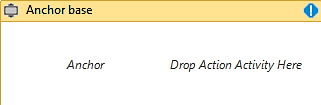
- There are two activities...