

Exception handling
Exception handling is a way to handle exceptions for a process that the program or the procedure has failed to execute.
For handling exceptions in a program, the best practice considered is to use the Try catch activity.
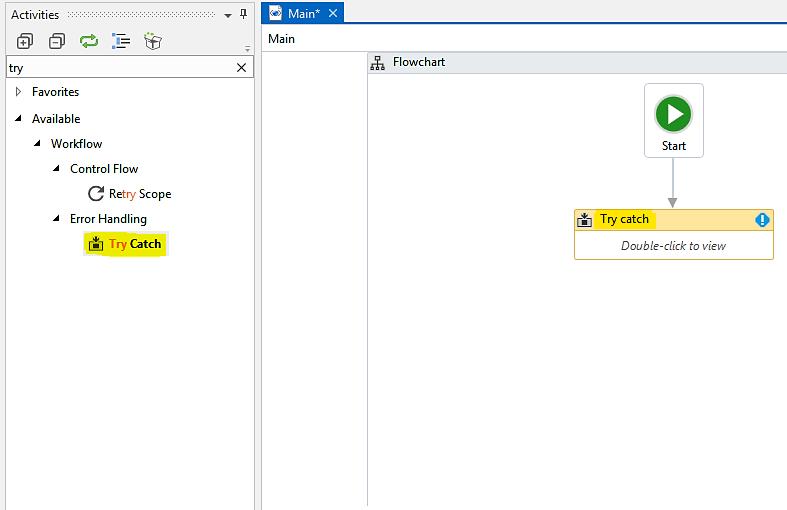
The Try catch activity can be found in the Activities panel. By dragging and dropping the Try catch activity into the workspace, we can handle exceptions. For handling errors in the Try catch block, we can divide the whole process into four parts just to make it simpler:
- Drag and drop the
Try catchactivity - Try block
- Catch block
- Finally block
Let's build a Try catch block to handle exceptions, in following steps:
- Drag and drop the
Try catchactivity: Create a blank project. Drag and drop theFlowchartactivity into the Designer panel. Search for theTry catchactivity in theActivitiespanel and drag it into theFlowchart. Set it as theStartnode:
Try: When we double-click on theTry catchactivity, dragged and dropped inside the workspace, space for theTryactivity...