

Displaying tabbable panes with Notebook
The ttk.Notebook class is another of the new widget types introduced in the ttk module. It allows you to add many views of your application in the same window area, letting you choose the one that should be displayed by clicking on the tab associated to each view.
Tabbed panels are a good way to reuse the same portion of your GUI if the contents of multiple regions do not need to be shown at the same time.
Getting ready
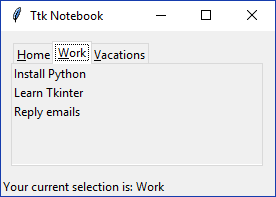
The following application shows some to-do lists divided into tabs by category—lists are displayed with read-only data to simplify the example:
How to do it...
We instantiate thettk.Notebook with a fixed size, and then loop over a dictionary with some predefined data that will serve to create the tabs and add some labels to each region:
import tkinter as tk
import tkinter.ttk as ttk

class App(tk.Tk):
    def __init__(self):
        super().__init__()
        self.title("Ttk Notebook")

        todos = {
            "Home": ["Do the laundry...