

Using variables in menus
Apart from calling commands and nesting submenus, it is also possible to connect Tkinter variables to menu entries.
Getting ready
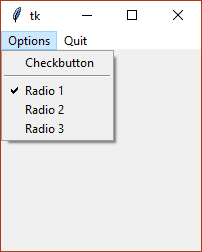
We will add a check button entry and three radio button entries to the Options submenu, divided by a separator. There will be two underlying Tkinter variables to store the selected values, so we can retrieve them easily from other methods of our application:
How to do it...
These types of entries are added with the add_checkbutton and add_radiobutton methods of the Menu widget class. Like with regular radio buttons, all are connected to the same Tkinter variable, but each one sets a different value:
import tkinter as tk

class App(tk.Tk):
    def __init__(self):
        super().__init__()
        self.checked = tk.BooleanVar()
        self.checked.trace("w", self.mark_checked)
        self.radio = tk.StringVar()
        self.radio.set("1")
        self.radio.trace("w", self.mark_radio)

        menu = tk.Menu(self)
        submenu = tk.Menu...