

Configuring a performance monitor data collector set
In this recipe, you are going to prepare a Performance Monitor data collector set using the same settings that you used in the previous recipe. This time the performance monitoring operation is going to run in the background, and you will be able to inspect the performance data after it completes.
How to do it...
- Open the
Performance Monitor. - In the tree on the left side of the window, navigate to the
Performance Monitornode, as described in the previous recipe. - When the graph is visible, right-click the
Performance Monitornode, expand theNewsub-menu in the shortcut menu, and selectData Collector Set, as shown here:
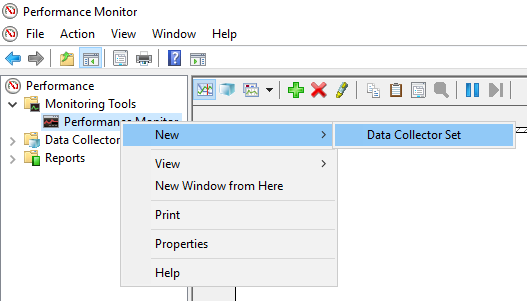
- The
Data Collector Setwizard starts. On the first page, enterChapter06in theNametext box, and then clickNext. - On page two, leave the default value of the
Root directoryproperty unchanged, and clickNext. - On page three, leave the
<Default>value of theRunas property unchanged, and make sure that the Save and close...