

Importing Azure Blob storage data
So far, we've created and dropped a HDInsight cluster and called a Pig script using the Azure Pig task. This recipe will demonstrate how to import data from an Azure Blob storage to a table in the staging schema.
Getting ready
This recipe assumes that you have completed the previous one.
How to do it...
- From the SSIS toolbox, drag and drop, and
Execute SQL Taskon the control flow, and rename itsql_truncate_Staging_StgCloudSales. - Double-click on it to open the
SQL Task Editor. Set the properties as follows and click on OK:Connection:cmgr_DWSQL Statement:TRUNCATE TABLE [Staging].[StgCloudSales];
- From the SSIS toolbox, drag a
Foreach Loop Containerand rename itfelc_StgCloudSales.
- Double-click on it to open the
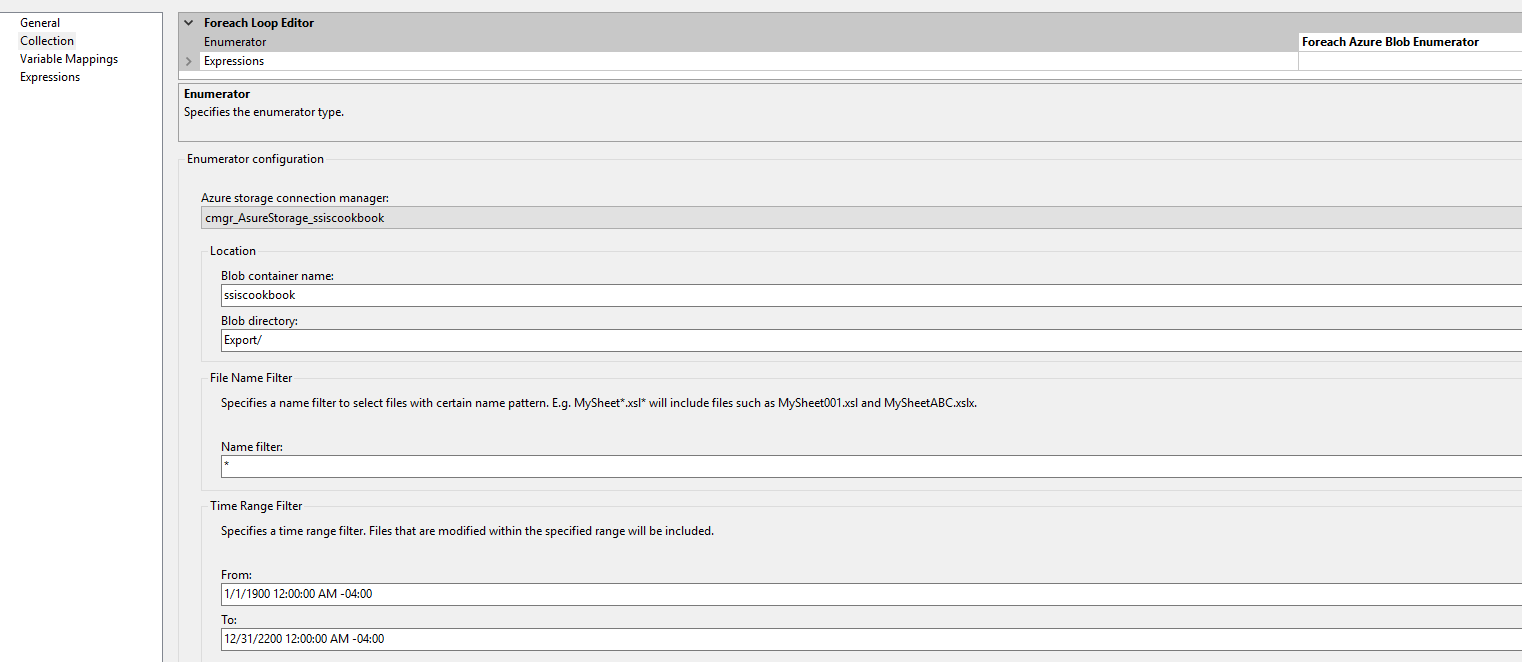
Foreach Loop Editor, and assign the properties in theCollectionpane, as shown in the following screenshot:
- Now go to the
Variable Mappingspane and add a string variable calledUser::AzureAggregatedData. Make sure the scope is at the package level...