

Deploying the source database with its data
The first thing we have to do now is to deploy the SQL Server database, which are AdventureWorksLT and AdventureWorksLTDW.
Getting ready
This section requires you to have copied the sample solution on your PC and opened the SSISCookBook.sln solution file.
How to do it...
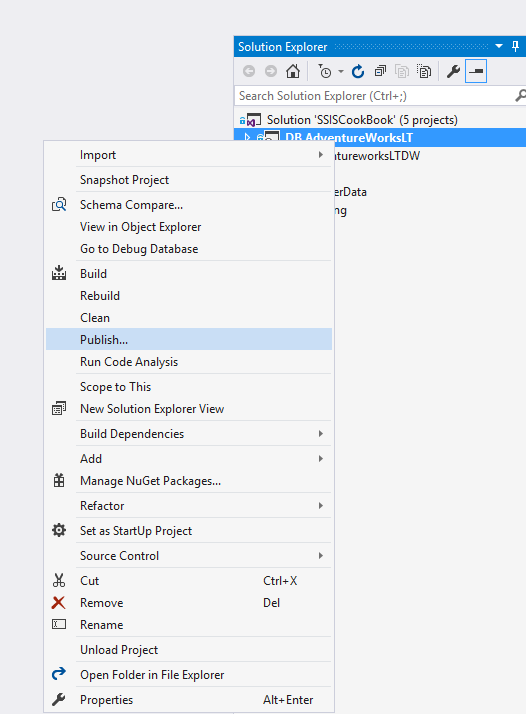
- In SQL Server Data Tools (Visual Studio), right-click on the
DB.AdventureWorksLTproject and selectPublish..., as shown in the following screenshot:
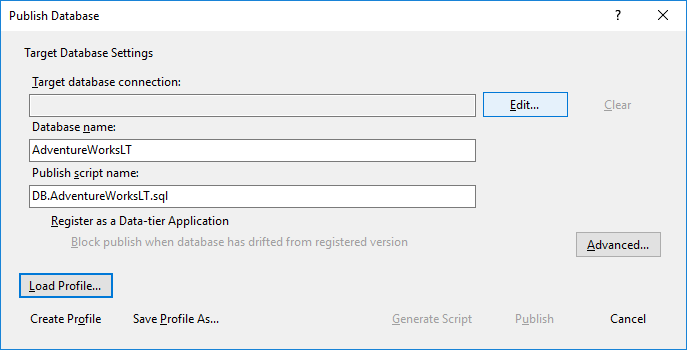
- The following screen appears; click on the
Edit...button to create a connection string to our local SQL Server instance:
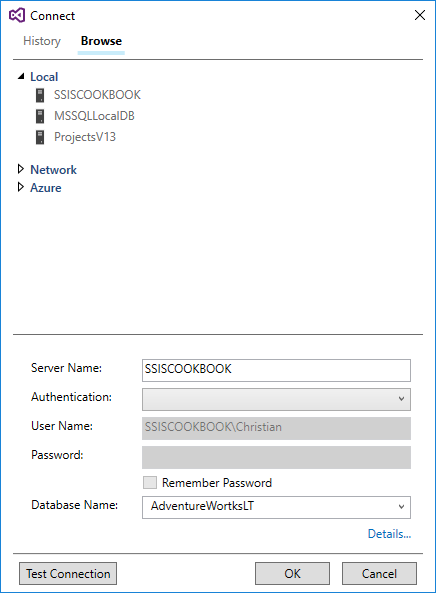
- As shown in the following screenshot, clicking on the
Browsetab brings up a screen where we can choose the SQL Server instance location. In our case, we'll chooseLocal. Expand theLocallabel and choose your SQL Server instance, in our caseSSISCOOKBOOK. TheServer Nametextbox will display the server you chose. ClickOKto return to the previous screen.
- Back in the
Publish Databasescreen, click on theAdvanced...