

Using multisites in Drupal 8
Drupal provides the ability to run multiple sites from one single Drupal code base instance. This feature is referred to as multisite. Each site has a separate database; however, extensions stored in modules, profiles, and themes can be installed by all of the sites. Site folders can also contain their own modules and themes. When provided, these can only be used by that one site.
The default folder is the default folder used if there is no matching domain name.
Getting ready
If you are going to work with multisite functionality, you should have an understanding of how to set up virtual host configurations with your web server. In this recipe, we will use two subdomains under localhost, called dev1 and dev2.
How to do it...
We will use multisites in Drupal 8 by two subdomains under localhost:
- Copy
sites/example.sites.phptosites/sites.php. - Create a
dev1.localhostanddev2.localhostfolder inside thesitesfolder. - Copy the
sites/default/default.settings.phpfile intodev1.localhostanddev2.localhostassettings.phpin their respective folder:
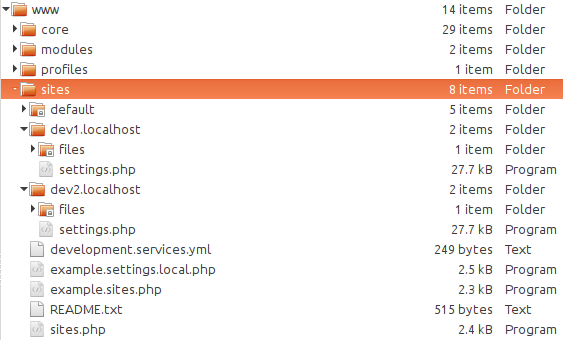
- Got to
dev1.localhostand run the installation wizard. - Got to
dev2.localhostand verify that you still have the option to install a site!
How it works...
The sites.php must exist for the multisite functionality to work. By default, you do not need to modify its contents. The sites.php file provides a way to map aliases to specific site folders. The file contains the documentation for using aliases.
The DrupalKernel class provides findSitePath and getSitePath methods to discover the site folder path. On Drupal's Bootstrap, this is initiated and reads the incoming HTTP host to load the proper settings.php file from the appropriate folder. The settings.php file is then loaded and parsed into a \Drupal\Core\Site\Settings instance. This allows Drupal to connect to the appropriate database.
There's more...
Let's understand the security concerns of using multisite.
Security concerns
There can be cause for concern if you are using multisite. Arbitrary PHP code executed on a Drupal site might be able to affect other sites sharing the same code base. Drupal 8 marked the removal of the PHP filter (https://www.drupal.org/docs/8/modules/php/overview) module that allowed site administrators to use PHP code in the administrative interface. Although this mitigates the various ways an administrator had easy access to run PHP through an interface, it does not mitigate the risk wholesale. For example, the PHP filter module is now a contributed project and could be installed.
Domain aliases
The sites.php file provides a way to add domain aliases. This can be useful when you use a multisite functionality and need to develop it locally. A simple example would be providing a local.alias to each site.
If you had example.com and mycompany.com as different site directories, the following mapping would allow local.example.com and local.mycompany.com to map to those directories:
<?php$sites['example.com'] = 'example.com';$sites['local.example.com'] = 'example.com';$sites['mycompany.com'] = 'mycompany.com';$sites['local.mycompany.com'] = 'mycompany.com';
See also...
- Refer to Multisite documentation on Drupal athttps://www.drupal.org/documentation/install/multi-site.