

Creating an Operational Intelligence application
This recipe will show you how to create an empty Splunk app that we will use as the starting point for building our Operational Intelligence application.
Getting ready
To step through this recipe, you will need a running Splunk Enterprise server, with the sample data loaded from Chapter 1, Play Time - Getting Data In. You should have also completed the recipes from the earlier chapters. You should be familiar with navigating the Splunk user interface.
How to do it...
Follow these steps to create the Operational Intelligence application:
- Log in to your Splunk server.
- From the
Appsmenu in the upper left-hand corner of the home screen, click on the gear icon, as shown in the following screenshot: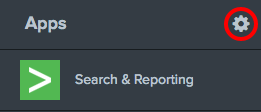
- Click on the
Create appbutton:
- Complete the fields in the box that follows. Name the app
Operational Intelligenceand give it a folder name ofoperational_intelligence. Add in a version number and provide an author name. Ensure thatVisibleis set toYes...