

File handling using the mv command (moving and renaming)
The mv or move command is used to move files from one directory to another without creating any duplicates, unlike the case with the cp or copy command.
Getting ready
Since mv is a built-in command on Linux, we don't have to configure anything else to understand its workings.
How it works...
Let's take a look at how to use the mv command by taking different examples:
- To move
testfile1.txtfrom the current directory to any other directory, such as- home/practical/example, the command will be as follows:
mv testfile1.txt /home/practical/example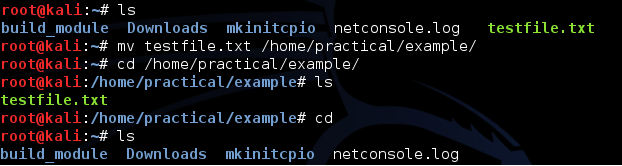
This command will work only when the location of the source file is different from the destination location.
When we move the file using the preceding command, the file will get deleted from the original location.
- To move multiple files using a single command, we can use this command:
mv testfile2.txt testfile3.txt testfile4.txt /home/practical/exampleWhen using the preceding command, all the files that...