

Testing LevelGenerator
We went through some difficult coding recently. You might feel a bit uncomfortable still, but don't worry. The more time you spend coding, the more confidence you gain.
To test whether everything works correctly, we need to do some setup in the Scene:
- Create a new
GameObjectand call itLevelGenerator. - Add a
LevelGeneratorComponent to theLevelGeneratorgame object. - Create a new game object and call it
startPoint. - Position the start point game object in the scene so that it is below and behind the
Playergame object. Thus, the first generated level piece will appear directly under thePlayer. - Assign the
LevelPieceBasicgame object as the first element on theLevelPrefabsarray. - Assign the
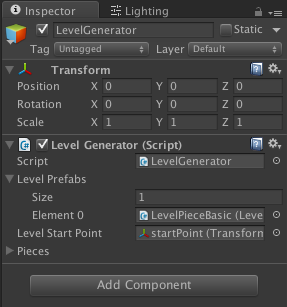
startPointgame object into the correct slot in theLevelGeneratorcomponent:
- Ready to test? Click
Playin Unity. If all goes well, you should see two initial level pieces generated.
Congratulations! You just wrote a working part of a procedurally–generated level. I get it's not the most...