
Building your first app
For our first app, we will use one of the templates provided with Splunk. To get started, navigate to the Splunk Apps page (as we described earlier in this chapter) and then click on Create app. The following page will open:
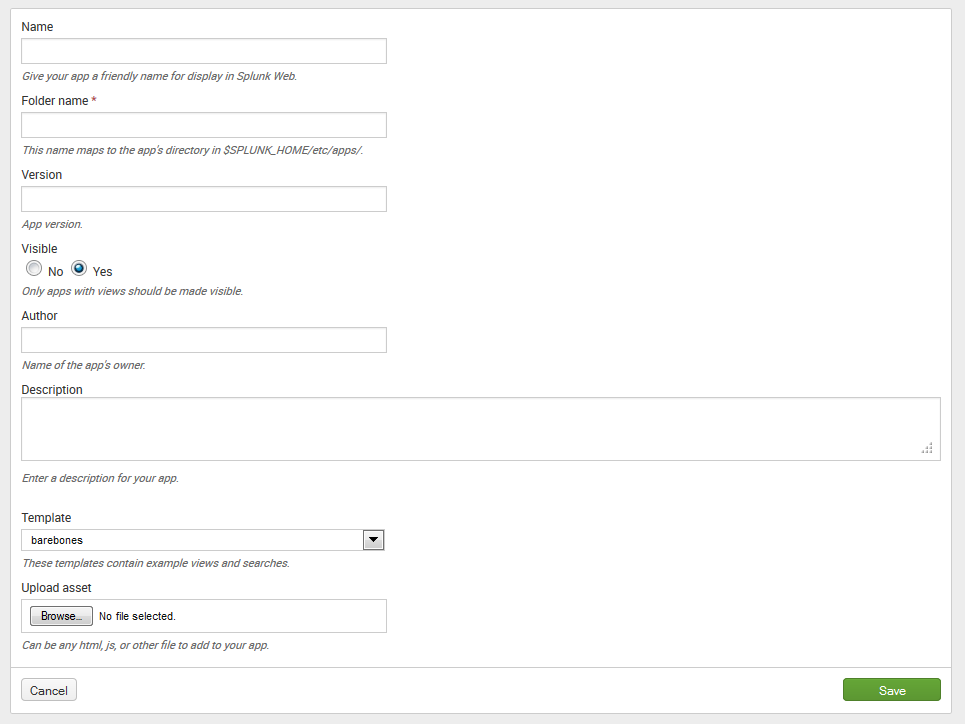
Set the fields as follows:
- Set
NametoImplementing Splunk App One. This name will be visible on the home screen, in theAppmenu, and in the app banner on the upper-left side of the window. - Set
Folder nametois_app_one. This value will be the name of the app directory on the filesystem, so you should limit your name to letters, numbers, and underscores. - Set
Versionto1.0(it's our first version of the app!). - Set
VisibletoYes. If your app simply provides resources for other apps to use, there may be no reason for it to be visible. - Fill in the
Author(your name!) andDescription(describe your app). - Set
Templatetobarebones. Thebarebonestemplate contains sample navigation and the minimal configuration required by an app. Thesample_apptemplate...