





















































Search icon CANCEL
Subscription
0
Cart icon
Your Cart (0 item)
Close icon
You have no products in your basket yet
Save more on your purchases! discount-offer-chevron-icon
Savings automatically calculated. No voucher code required.
Arrow left icon
Explore Products
Best Sellers
New Releases
Books
Videos
Audiobooks
Learning Hub
Newsletter Hub
Free Learning
Arrow right icon
timer SALE ENDS IN
0 Days
:
00 Hours
:
00 Minutes
:
00 Seconds
Arrow up icon
GO TO TOP
Android High Performance Programming

You're reading from   Android High Performance Programming Build fast and efficient Android apps that run as reliably as clockwork in a multi-device world

Arrow left icon
Product type Paperback
Published in Aug 2016
Publisher Packt
ISBN-13 9781785288951
Length 412 pages
Edition 1st Edition
Languages
Tools
Arrow right icon
Authors (2):
Arrow left icon
 López Mañas López Mañas
Author Profile Icon López Mañas
López Mañas
 Grancini Grancini
Author Profile Icon Grancini
Grancini
Arrow right icon
View More author details
Toc

Table of Contents (17) Chapters Close

Android High Performance Programming
Credits
About the Authors
About the Reviewer
www.PacktPub.com
Preface
1. Introduction: Why High Performance? 2. Efficient Debugging FREE CHAPTER 3. Building Layouts 4. Memory 5. Multithreading 6. Networking 7. Security 8. Optimizing Battery Consumption 9. Native Coding in Android 10. Performance Tips Index

Getting started


In order to get started with ClassyShark, the fastest way is to download the last .jar from the GitHub site (as the time of writing this book, version 6.6 can be downloaded from the following URL: https://github.com/google/android-classyshark/releases). Download the latest version and then run it from the console with the following command:

java –jar route/to/ClassyShark.jar

This will start the application. You will be prompted with a screen like the following one:
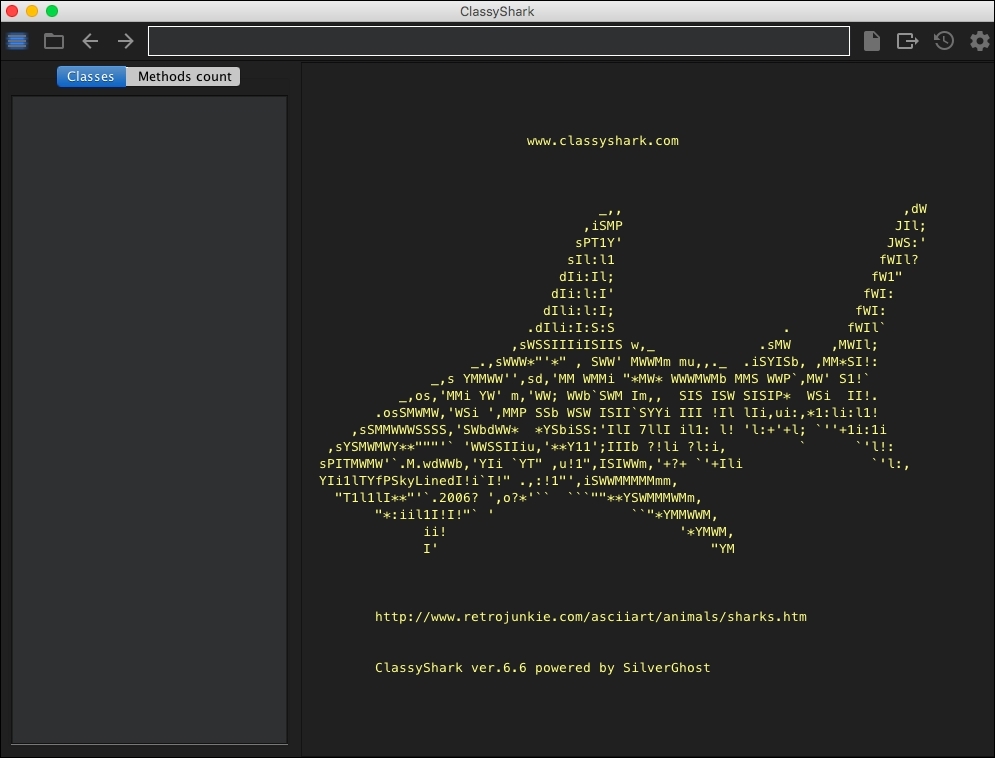
It is now time to open a sample APK to see its composition and start using ClassyShark. Click on the icon and a screen to select an APK will be displayed. Select an APK from one of your projects (if you have been using Android Studio, they are generally in the build/output/apk folder). For this purpose, any APK file will be valid.

Note

If you want to automate ClassyShark or you feel more comfortable with the command line, it is also possible to open the APK directly by running the following command:

java –jar ClassyShark...
CONTINUE READING
83
Tech Concepts
36
Programming languages
73
Tech Tools
Icon Unlimited access to the largest independent learning library in tech of over 8,000 expert-authored tech books and videos.
Icon Innovative learning tools, including AI book assistants, code context explainers, and text-to-speech.
Icon 50+ new titles added per month and exclusive early access to books as they are being written.
Android High Performance Programming
You have been reading a chapter from
Android High Performance Programming
Published in: Aug 2016
Publisher: Packt
ISBN-13: 9781785288951
Register for a free Packt account to unlock a world of extra content!
A free Packt account unlocks extra newsletters, articles, discounted offers, and much more. Start advancing your knowledge today.
Unlock this book and the full library FREE for 7 days
Get unlimited access to 7000+ expert-authored eBooks and videos courses covering every tech area you can think of
Renews at $15.99/month. Cancel anytime
Visually different images
Modal Close icon
Modal Close icon