

Playing audio and adding audio controls
In this iteration, we will code the features marked in the following screenshot:
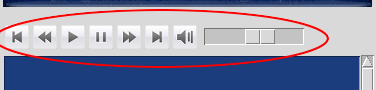
This includes the play/stop, pause/unpause, next track, previous track, fast forward, rewind, volume change, and mute/unmute features.
Adding the play/stop function
Now that we have a playlist and a Player class that can play audio, playing audio is simply about updating the current track index and calling the play method.
Accordingly, let's add an attribute, as follows (see code 5.04—view.py):
current_track_index = 0
Furthermore, the Play button should act as a toggle between the play and stop functions. The Python itertools module provides the cycle method, which is a very convenient way to toggle between two or more values.
Accordingly, import the itertools module and define a new attribute, as follows (see code 5.04—view.py):
toggle_play_stop = itertools.cycle(["play","stop"])
Now, every time we call next(toggle_play_stop), the value returned toggles between the play and...