





























































Using the toolkit to build the GUI
Now that we have created the fundamental GUI building blocks, we just need to put them all together to create our first application:
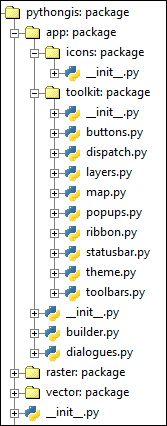
To do so, reopen the empty app/builder.py module we created at the beginning of this chapter. Let's create a basic GUI widget that represents the entirety of our application, populated with our widgets in a traditional layout:
Our Ribbon widget at the top
Our LayersPane on the left
The MapView on the right
The StatusBar container at the bottom
Here is the code:
# Import builtins
import sys, os
import time

# Import GUI library
import Tkinter as tk

# Import internals
from .toolkit import *
from .dialogues import *

# Import GIS functionality
import pythongis as pg


class GUI(tk.Frame):
    def __init__(self, master, **kwargs):
        tk.Frame.__init__(self, master, **kwargs)

        # Place top ribbon area
        self.ribbon = Ribbon(self)
        self.ribbon.pack(side="top", fill="x")
        # Add tabs
        hometab = self...



