





























































Alias
Alias in shell refers to giving another name to a command or group of commands. It is very useful when a name of a command is long. With the help of alias, we can avoid typing a bigger name and invoke a command by a name as per your convenience.
To create an alias, alias shell builtin command is used. The syntax is as follows:
alias alias_name="Commands to be aliased"
Creating alias
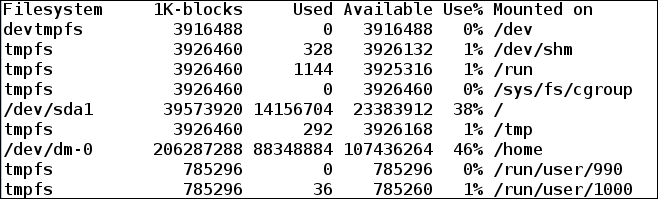
To print a disk space in a human-readable format, we use the df command with the -h option. By making alias of df -h to df, we can avoid typing again and again df -h.
The output of the df command before aliasing it to df -h is shown in the following screenshot:
$ df
Now, to create alias for df -h to df, we will execute the following command:
$ alias df="df -h"	# Creating alias
$ df
The output obtained is as follows:
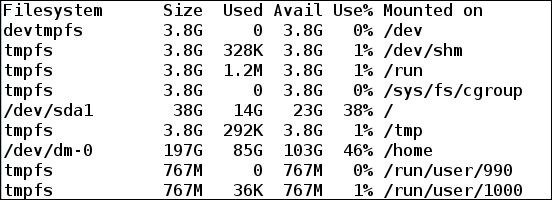
We see that after creating alias of df -h to df, a default disk space is printed in a human-readable format.
Another useful example can be aliasing the rm command to rm -i. Using rm with the -i option...



