

Adding TensorFlow to your own Android app
It turns out that adding TensorFlow to your own Android app is easier than iOS. Let's jump right to the steps:
- If you have an existing Android app, skip this. Otherwise, in Android Studio, select
File|New|New Project...and accept all the defaults before clickingFinish. - Open the
build.gradle(Module: app) file, and add compile'org.tensorflow:tensorflow-android:+'inside and at the end of dependencies{...};. - Build the
gradlefile and you'll seelibtensorflow_inference.so, the TensorFlow native library that Java code talks to, inside the subfolders of the locationapp/build/intermediates/transforms/mergeJniLibs/debug/0/libof yourappdirectory. - If this is a new project, you can create the
assetsfolder by first switching toPackages, then by right-mouse clicking the app and selectingNew|Folder|Assets Folder, as shown in the following screenshot, and switching back fromPackagestoAndroid:
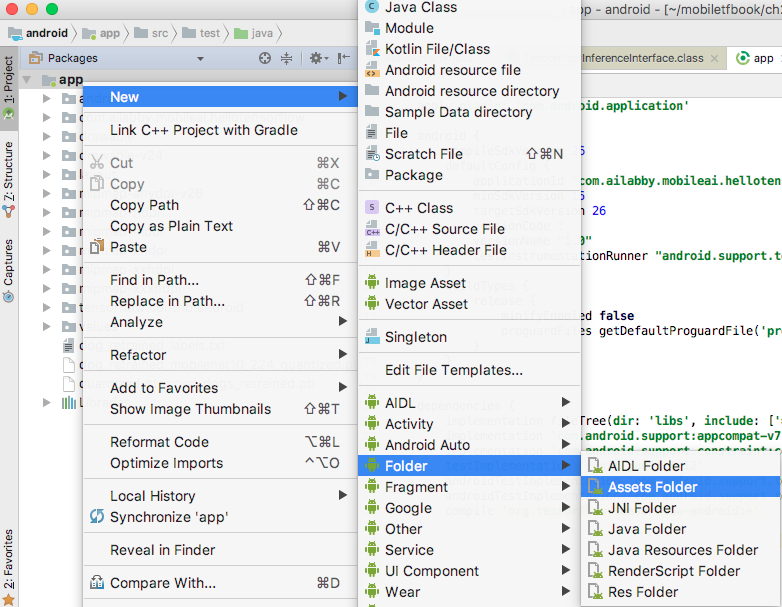
Figure 2.13 Adding Assets Folder to a new project
- Drag...