

Getting, reading in, and cleaning bitcoin price data
We will start by importing the necessary modules.
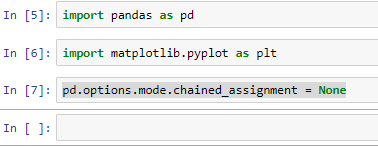
Import pandas to enable you to read in the data and start exploring it. The following screenshot shows the import pandas command:

Also, import matplotlib for drawing plots from the data.
We need to set some options for pandas and matplotlib. The following screenshot shows the command for importing matplotlib:

The first option we will set is called options.mode.chained_assignment = None.
Note
The preceding option is to make sure that the operations are for the cleanup, which will be performed on the pandas DataFrame objects; we want the cleanup to happen on the original DataFrame objects and not on copies.
The following screenshot shows the options.mode.chained_assignment = None option:
Also, set matplotlib to visualize and display all the charts shown in the following screenshot:

The price data we have is from coindesk.com, as shown in the following screenshot, and it is freely available for download...