

Using Gulp for creating auto code compiling and server reloading
With the little introduction we gave about Gulp in the preceding section, we are going to write a gulpfile for telling the computer to execute a few tasks.
I install Gulp and Gulp-shell using npm:
npm install gulp gulp-shellAfter this, create a gulpfile.js in the root directory of the project. Here, it is github.com/src/narenaryan/romanserver. Now add this content to gulpfile.js. First, whenever a file changes, install binary task gets executed. Then, the supervisor will be restarted. The watch task looks for any file change and executes the preceding tasks. We are also ordering the tasks so that they occur one after the other synchronously. All of these tasks are Gulp tasks and can be defined by the gulp.task function. It takes two arguments with task name, task. sell.task allows Gulp to execute system commands:
var gulp = require("gulp");
var shell = require('gulp-shell');

// This compiles new binary with source change
gulp.task("install-binary", shell.task([
 'go install github.com/narenaryan/romanserver'
]));

// Second argument tells install-binary is a deapendency for restart-supervisor
gulp.task("restart-supervisor", ["install-binary"], shell.task([
 'supervisorctl restart myserver'
]))

gulp.task('watch', function() {
 // Watch the source code for all changes
 gulp.watch("*", ['install-binary', 'restart-supervisor']);

});

gulp.task('default', ['watch']);
Now, if you run the gulp command in the source directory, it starts watching your source code changes:
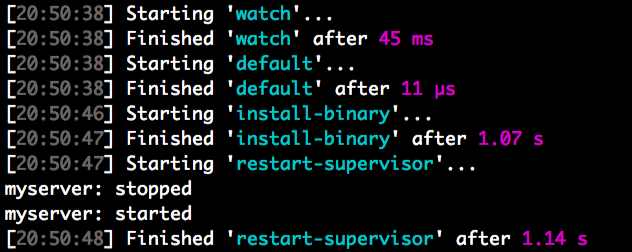
gulpNow, if we modify the code, then the code is compiled, installed, and the server restarted in a flash:
Understanding the gulpfile
In the gulpfile, we are performing the following instructions:
- Import Gulp and Gulp-shell.
- Create tasks with
shell.taskas the function to execute. shell.taskcan execute a command-line instruction. Keep your shell commands inside that function.- Add a watch task for watching source files. The task list will be executed when files are modified.
- Create a default task for running. Add a watch to it.
Gulp is a great tool for these kinds of use cases. So, please go through the official documentation of Gulp at http://gulpjs.com/.