


Using the statistics – protocol hierarchy menu
In this recipe, we will learn how to get protocol hierarchy information of the data that runs over the network.
Getting ready
Start Wireshark, click on Statistics.
How to do it...
- From the
Statisticsmenu, chooseProtocol Hierarchy:
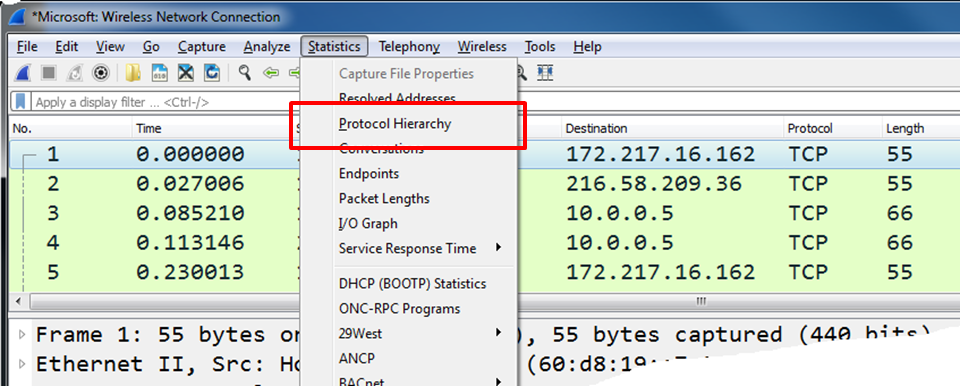
What you will get is data about the protocol distribution in the captured file. You will get the protocol distribution of the captured data.
- The partial screenshot displayed here depicts the statistics of packets captured on a per-protocol basis:
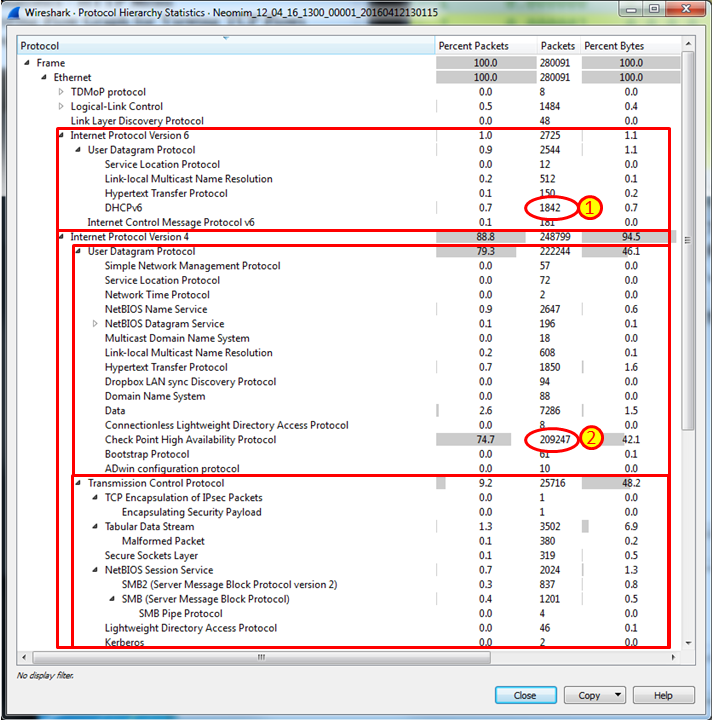
What you will get is the Protocol Hierarchy window:
Protocol: The protocol namePercent Packets: The percentage of protocol packets from the total captured packetsPackets: The number of protocol packets from the total captured packetsPercent Bytes: The percentage of protocol bytes from the total captured packetsBytes: The number of protocol bytes from the total captured packetsBit/s: The bandwidth of this protocol, in relation to the capture timeEnd Packets: The absolute number of...