

Setting up our Android Virtual Device for development
Android Emulator will enable us to test our Android application on a computer and we will not require an actual device to test.
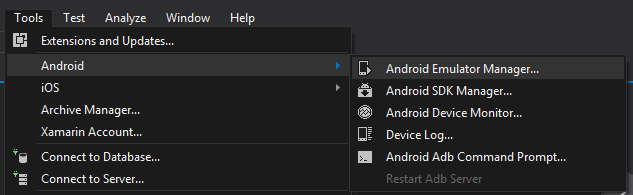
- Let's click on
Tools|Android|Android Emulator Manager:
- To make this process easier and simpler, we'll start with the existing mobile templates available for Android Emulator.
- Go to the
Device Definitionstab shown in the following screen. Once you reach theDevice Definitionsscreen, scroll down until you see Nexus devices in the list:
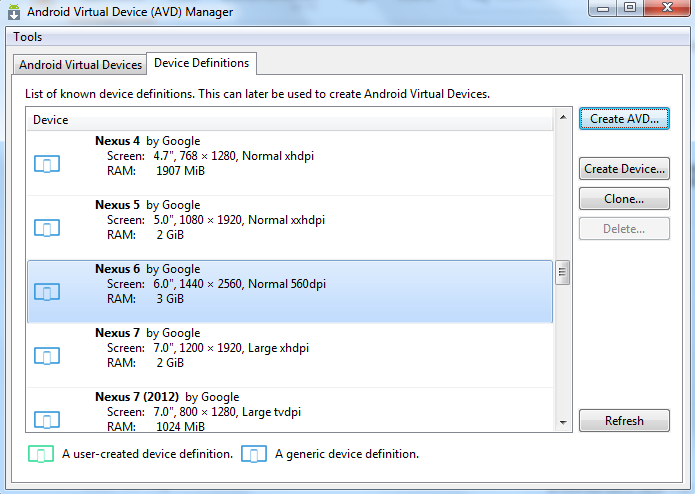
- Select the Nexus device of your choice and click on the
Create AVDbutton on the right-hand side.
- Next, you should get a window such as the following, where you can customize your Android Emulator to your requirements:
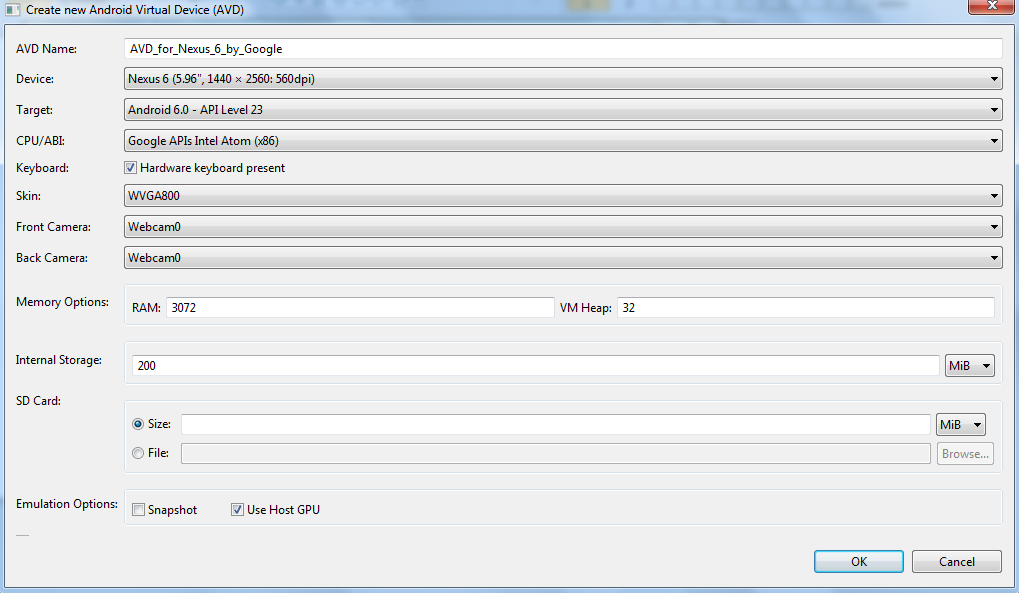
- Fill in all the required details. You can refer to the preceding screenshot for help. Once you click
OK, AVD Manager will create a new Android Emulator for you. - To verify that our emulator is created, let's go back to the
Android Virtual Devicestab in theAndroid Virtual...